
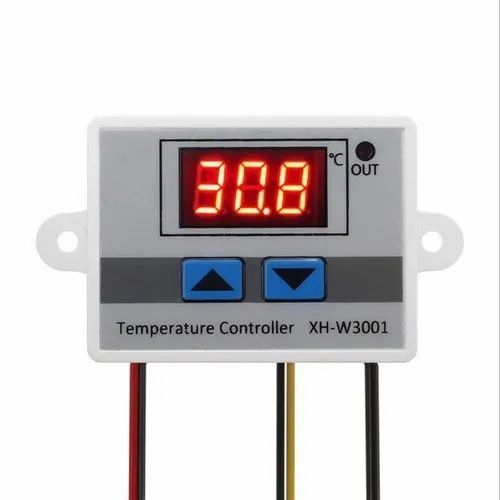

XH-W3001 12V 120W Digital thermostat control board
12 sold in last 24 hours
A high-power digital thermostat control board that manages heating and cooling loads up to 1500W for 220V AC systems with precise control.
Key Features:
- Supports high-power appliances
- Precise temperature setting
- Clear LED display
- Easy-to-install design
- Up key: Press once to display the start temperature. Long press to set start temperature.
- Down key: Press once to display the stop temperature. Long press to set stop temperature.
- Digital display HHH: If the digital tube displays HHH, this is because the detected temperature is beyond the measurement range.
- Factory Default: To restore settings to factory default, press both the up and down buttons for 3 seconds while the device is on.
- Voltage:220V AC
- Max Load:1500W
- Rated Current:10A
- Temperature Range:-50°C to 110°C
- Relay Control Accuracy:±0.1°C
- Sensor:NTC thermistor
- Dimensions:Approx 60mm x 45mm x 31mm
- Weight:Approx 50g
- Industrial heating systems
- Room climate control
- Fermentation
- Environmental chambers
Using the W3001 Temperature Controller
1. Setting the Start Temperature:
-
Tap the "Up" button once to view the current start temperature.
-
Hold the "Up" button for about 3 seconds until the start temperature begins to flash, indicating it’s ready to be adjusted.
2. Setting the Stop Temperature:
-
Tap the "Down" button once to view the stop temperature.
-
Hold the "Down" button for about 3 seconds until the stop temperature starts flashing, allowing you to set a new value.
3. Restoring Default Settings:
-
While the device is powered on, press and hold both the "Up" and "Down" buttons simultaneously.
-
The display will show "888" briefly, then automatically reset to the factory default settings.
No Specifications